
Skip to content

Editors run on coffee and cookies.

Ours are the stats, ads and better-emails kind. Sorry, no chocolate chips. Privacy policy

Statistics

Google Analytics counts visits and sales.

Advertising

Google may use your visits for ads.

Personalised emails

Our emails follow what you look at here.

Unreal Engine 5 Unreal Engine 5

Learn 3D Modelling in Unreal Engine 5

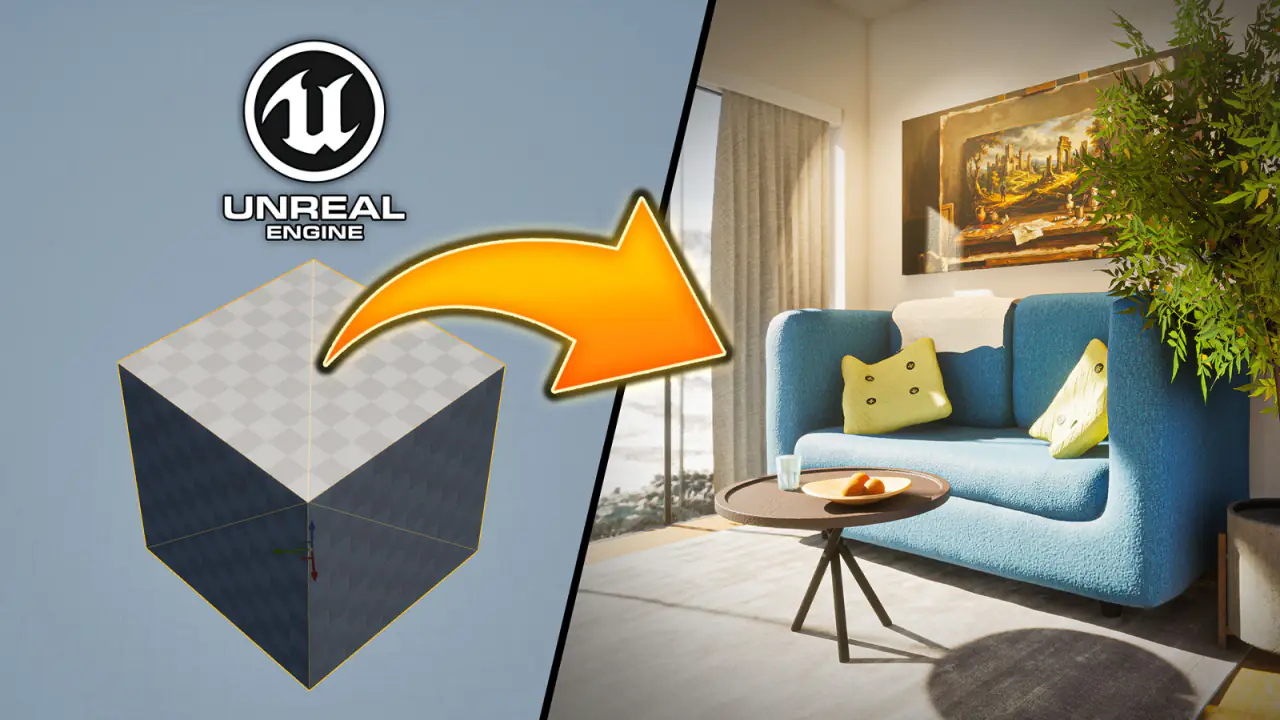
Make the 3D models your scenes are missing, without leaving Unreal Engine 5. Go from a single box to a cabin with a couch you sculpt yourself.

By Jordy Vandeput 15 lessons 1h 22m Project files included
Save 88% Or take everything Cinecom Complete Bundle 15 courses · 24 video packs · 1 partner deal $197 $1,763.70 total value See the bundle
Trailer Cinecom
What you'll learn
  • Model your own props and furniture in Unreal Engine 5
  • Build architecture from a floor plan
  • Texture models so materials fit and line up
  • Sculpt soft, organic shapes
  • Add the detail that makes a model look realistic
About this course

Make the 3D models your scenes are missing, without leaving Unreal Engine 5. In this beginner course you go from placing a single box to a cabin with a couch you sculpt yourself, using only the modeling tools built into the engine. No Blender, and no more settling for an asset that is almost right.

What you'll be able to do

  • Model props and furniture for your own scenes, from a simple table to a soft, sculpted couch.

  • Build architecture to exact measurements, starting from a floor plan.

  • Texture your models so materials fit, line up at the corners and show real depth.

  • Sculpt organic shapes like cushions, pillows and fabric.

  • Add the small details that make a model look real.

  • Reshape models you download, so an asset that is almost right becomes the one you need.

What you build

The course follows one project: a small cabin. You raise its walls on top of a floor plan, give it brick, paint, wood and glass, then furnish it with a table and a couch you shape yourself, down to the pillows, the blanket and the buttons. Smaller pieces along the way, like a bottle, a spring and a bigger axe, let you practice each technique on its own.

The last lesson gives you two assignments: rebuild Jordy's finished cabin with its lights and furniture, or fill your own cabin with models you design.

How the course is built

There are 15 lessons with a total runtime of about 1 hour 22 minutes. The lessons build on each other, and most end with a short task to try before the next one.

The project file is included as a download (UE5_Modeling_Project.zip, about 530 MB) with the finished cabin. The Quixel materials Jordy uses can't be shared, so you apply your own from the Fab marketplace.

Who this course is for

Filmmakers, virtual production artists and game makers who already use Unreal Engine 5 and want to make their own models. You don't need any modeling experience. You should know the basics of the engine, such as moving through the viewport and placing actors. If you are new to it, start with Unreal Engine 5 for Beginners.

Unreal Engine is not a dedicated modeling program, and Jordy says that for some work a professional will still pick Blender. This course shows how far you get without leaving the engine.

What you need

  • Unreal Engine 5, recent enough to include the Fab marketplace and Nanite tessellation.

  • Materials from the Fab marketplace. Quixel Megascans is no longer free. Jordy shows how to find free materials there, such as a free glass material pack, and some steps in the Nanite lesson are specific to Quixel materials.

  • A computer that runs Unreal Engine 5 smoothly. Very detailed meshes can make the editor slow, and Jordy shows how he works around that.

Lessons
15 lessons 1h 22m 2 free previews
See what you will be able to make by the end of the course, like a small house with a couch and furniture, and why you can do all of it in Unreal Engine 5 without learning a separate modeling program.
Make your first models in Unreal Engine 5 and turn simple shapes into the start of a house, with walls and a staircase. You also see why models made this way are safe to edit, unlike the engine's own shapes.
Block out a room quickly with shapes you can keep changing, and cut openings for doors and windows wherever you want them. It is the fastest way to sketch walls and floors before you commit to a final model.
Build a house to exact measurements by tracing a floor plan, so every wall, window and door lands where the drawing puts it. You also set up the editor for the precision that architecture needs.
Turn the bare house into a home with brick outside, paint inside, a wooden floor and glass. You find materials on the Fab marketplace, including free ones, and learn to place them surface by surface.
Add glass windows and turn your building blocks into finished models that are easy to handle and reuse. You also learn to keep backups and plan ahead so you can still change the look of a single wall later.
Step out of the house and model props from a drawn outline: a table in under a minute, a bottle and a spring. This is how you make the shapes that boxes and cylinders can't give you.
Reshape an existing model instead of starting over, and turn a plain table into a pool table with softened edges. Taking the sharp edges off is the first habit that makes your models look real.
Take control of where each material goes on a model and fix stretched textures, so the bricks of your house meet cleanly at every corner. The pool table gets its green felt along the way.
Give a flat brick wall real depth without modeling a single brick, using Nanite tessellation. You do it on a ready-made material and on one you build from a single photo of pebbles.
Bend and stretch a model you downloaded until it fits your scene, like giving an axe a bigger blade. You also use it to break up flat ground so a pile of rocks against a wall looks natural.
Sculpt a mesh like clay into soft, organic shapes. You turn a plain box into a soft couch and learn why a model needs enough detail before you can sculpt it.
Fit a pillow naturally into the couch and make a blanket that looks like fabric instead of a stiff sheet. You also fix the hard seams that appear when a material meets the edges of the original box.
Finish the couch with the details that make it believable: separate cushions, proper legs and buttons with holes. You also learn to vary copies so nothing looks duplicated, and to add texture that reads as fabric.
Walk through Jordy's finished cabin and the details that make it believable, from the light fixtures to a bowl of oranges. Then pick one of two assignments to practice everything from the course.
Your instructor
Jordy Vandeput

Jordy Vandeput

Founder of Cinecom · 2.75M+ subscribers on YouTube

Jordy Vandeput is a Belgian filmmaker who has taught practical filmmaking to millions through Cinecom. He breaks professional techniques down into clear, repeatable steps you can use on your very next project.

Watch on YouTube

From the course
Questions
No. You make every model with the modeling tools already inside Unreal Engine 5. Jordy says a dedicated modeling program is still the better choice for some professional work, and this course shows how far you get without one.
Yes, as long as you know the basics of Unreal Engine 5, such as moving through the viewport and placing actors. The modeling starts from a single box. If you have never opened the engine, take Unreal Engine 5 for Beginners first.
Your own props, furniture and buildings, with materials that fit and the detail that makes them look real. In the course you build a cabin from a floor plan and furnish it with a couch you sculpt yourself.
Yes. Everything you make is a regular static mesh in your project, so it works in a game, a virtual production set or a cinematic render.
Yes. The editing, deforming and sculpting tools work on any mesh, so you can reshape a downloaded asset until it fits your scene.
Not necessarily. Jordy takes his materials from the Fab marketplace and shows how to find free ones there. Quixel Megascans is no longer free, and a few steps in the Nanite lesson are specific to Quixel materials.
Yes. You download the Unreal Engine project with the finished cabin from the course page in your account. The Quixel materials and the landscape around the cabin are not included, so you apply your own materials from Fab.
Sign in to your Cinecom account and every lesson streams right away, on any device. You keep access for life, for as long as the course stays in our catalogue.
One time. You pay once and keep lifetime access. There is no recurring subscription.
No. Lessons stream from your account. When a course comes with project files, you download those from the course page in your account.
No. When a course teaches a program, the course page shows which one, and you need your own copy.
Yes, you can sign in on your phone, tablet or computer. Your account is personal, and signing in on several devices at the same time can end your other sessions.
Yes. Paddle, our reseller, runs the checkout, charges any VAT or sales tax and sends you the invoice.
No. Our courses do not come with a certificate.
Watch the free preview lessons and browse the full lesson list before you buy. Every lesson unlocks the moment you enrol, so purchases are final. This never affects your statutory rights if a course is faulty or not as described: email [email protected] and we will help.
Cinecom Complete Bundle

Every course. Every pack. One price.

  • 15 courses
  • 24 video packs
  • 1 partner deal
  • Every future release
$197 Total value: $1,763.70 Save 88%